
How to Change Your Facebook Page URL (Vanity URL) — Step-by-Step
A custom Facebook Page web address, the so called “Vanity URL” makes your page easier to share, easier to remember, and more professional.
Imagine yourself in front of client saying:
Visit my Facebook page,
the address is www.facebook.com/1275ahhjash1763517236
Isn’t it better if you say:
the address is www.facebook.com/yesgrowonline
I am 100% sure you agree with me.
Instead of a long link full of numbers, you can change it to something clean like facebook.com/yourbusiness.
In this guide, you’ll learn exactly how to change your Facebook Page URL step-by-step, what the requirements are, and how to fix the most common errors.
What a vanity URL is and why it matters (branding, easy to share)
A vanity URL is a custom link with your name or business in it, like facebook.com/yourbrand, instead of a long link full of numbers.
It matters because:
- It’s easier for people to remember
- Easier to share
- Makes your page look more professional.
Before you start (requirements & rules)
A Facebook Page vanity URL must follow a few simple rules:
- It has to be unique
- Use only letters, numbers, and periods
- Be at least 5 characters long.
Your Page also needs to follow Facebook’s guidelines, and you must be an admin to change the URL.
Step-by-step: Change your Facebook Page URL
This step-by-step will guide you on the process.
1- Open the Facebook App on a Desktop or Laptop. This step-by-step will not work if you use your Phone or Tablet.
2- Log into Facebook, then click your profile photo in the top right.
3- Click See all profiles, then select the Page you want to switch into.
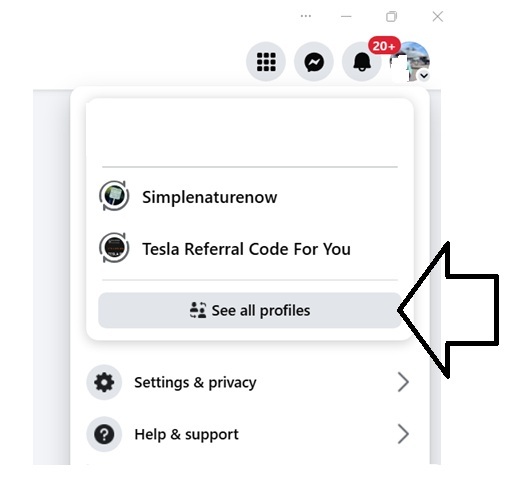
4- Click your Page’s profile picture at the top right.
5- Click Settings & Privacy, then click Settings.

6- Click Page setup.
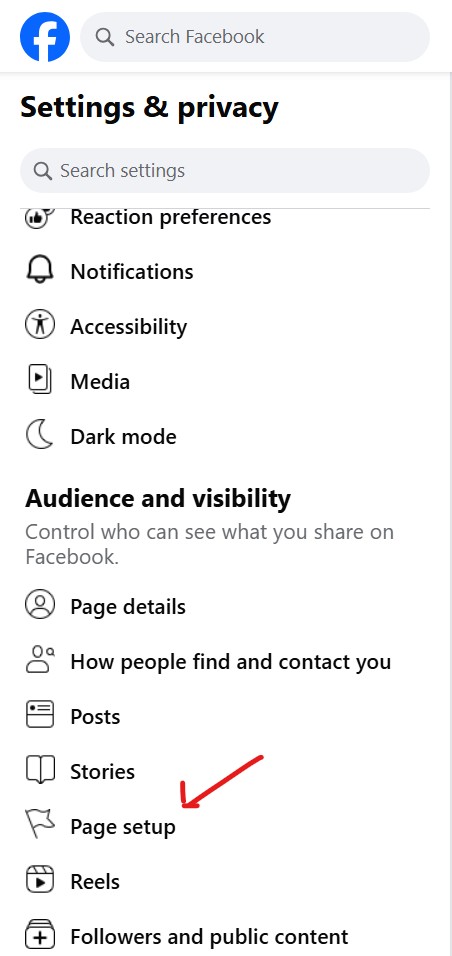
7- Below General Page Settings, click Edit next to your username.


8- Update your username, then click Save changes.
Good news, your new page web address should be working and ready for you.
These are the most common questions related to how to change your Facebook Page URL
1. How long does it take for a Facebook Page URL change to appear?
The change is usually instant. In some cases, it can take a few minutes for the new URL to show everywhere.
2. Can I change my Facebook Page URL more than once?
Yes, Facebook usually allows you to change your Page URL again, but not too often. If you change it too many times, Facebook may temporarily block further changes.
3. What if my desired username is already taken?
If the username is taken, you must choose a different one. Try adding a short word like your location, “official,” “hq,” or your business category.
4. Why does Facebook say my username is not available?
It can be taken by someone else, restricted by Facebook, or too similar to an existing Page. Check spelling, remove spaces, and make sure you follow Facebook’s username rules.
5. Are there restrictions on characters or length?
Yes. Usernames must be at least 5 characters and can only use letters, numbers, and periods. No spaces or special characters are allowed.
6. Will changing my URL break old links?
Yes, old links using your old URL will stop working. You’ll need to update your website, Instagram, business cards, and any place where the old link appears.
7. Do I need to be an admin to change the Page URL?
Yes. Only Page admins have permission to change the Page username and vanity URL.
8. Can I change the URL from my phone?
Yes. You can change it from the Facebook mobile app by going to Menu → Your Page → Settings → Page Info → Username.
9. Why can’t I change my Facebook Page URL?
You might not be an admin, your Page may have restrictions, or your Page may be too new. Violations or unusual activity can also block changes temporarily.
10. What makes a good Facebook Page vanity URL?
Keep it simple, short, and close to your brand name. Avoid numbers or extra words unless needed. It should be easy to remember and easy to share.
Reference
Meta Official Help Support Center: Reference: https://www.facebook.com/help/203523569682738/?helpref=uf_share